
How Malvertisers Weaponize Device Fingerprinting



HTTP cookies are utilized to keep a local record of visitors’ browsing activity in order to personalize the web surfing experience. Cookies also play a crucial role in authentication and tracking. Third party cookies in particular help to make the ad tech world go round by enabling platforms to bucket people into cohesive audience segments for targeting purposes.
In recent years, regulators and privacy advocates have set their sights on these browser cookies as a consumer threat:
https://threatpost.com/bucking-the-norm-mozilla-to-block-tracking-cookies-in-firefox/137110/
https://www.zdnet.com/article/gdpr-cuts-tracking-cookies-in-europe/
Perhaps rightfully so, considering that targeted ads have become so effectively pervasive that they look like black magic to folks outside of the industry, but there’s a whole world of tracking and fingerprinting beneath the surface of the web.
Fingerprinting:
: identification by analyzing characteristics unique to individuals
From the perspective of an ad tech entity (bad actor or not), the drawback of a browser cookie is its impermanence. Cookies can easily be removed by the user or tampered with by ad blocking scripts. However, researchers have long ago discovered a plethora of alternative techniques to do highly accurate tracking of devices.
A fingerprint in this context is built by collecting as many device specific attributes as possible and packaging that data into some sort of identifier, but before we look at an example, let’s talk about what it means to have an effective dataset.
The efficacy of a device fingerprint is measured in entropy.
Entropy
: a logarithmic measure of the rate of transfer of information in a particular message or language.
Within this context, entropy is measured in bits, but what does that actually mean? The higher the entropy, the more unique that fingerprint is likely to be among a larger sample set. The calculation is fairly straightforward as well. For example:
10 bits of entropy = 2¹⁰ = 1024
In other words, a fingerprint with 10 bits of entropy would mean that 1 in 1024 devices would share that exact fingerprint.*
*This example was borrowed from:
https://thetinhat.com/blog/primers/what-is-device-fingerprinting.html
Fortunately for folks trying to track you, the modern web browser has a ton of metadata that’s easily accessible on the client-side via Javascript. Here’s the partial output of the Navigator object alone:
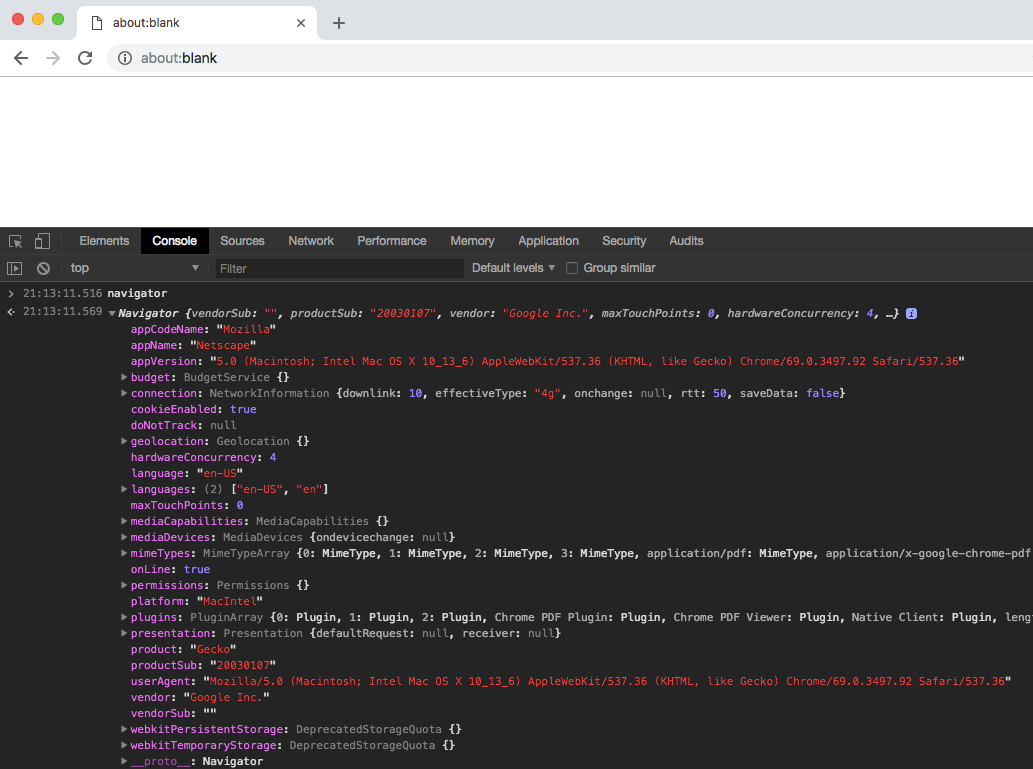
There are literally hundreds of objects and APIs available for pilfering browser data:
The question is then: what subset of this metadata provides enough entropy to create that sense of uniqueness?
Let’s consider this widely used fingerprinting library:
The library has about ~25 options baked in that a developer can use to build a fingerprint, along with about another dozen in active development. This toolset alone can likely produce a fingerprint with enough entropy to easily identify a a specific device out of tens of thousands, if not more, and the surface is rapidly broadening as browser expansion takes place.
For example, the advent of HTML5 in 2014 introduced the Canvas API, which was promptly discovered to have certain nuances that made it a boon for non-cookie based tracking. At a high level, canvas fingerprinting works by rendering an image or text on the canvas object. The image data is then translated to a non-visual representation in the form of a string of characters in order to create the fingerprint. Differences in the devices’s hardware will influence the resulting fingerprints despite the same code. The desired effect can easily be achieved in just several lines of code, and this is just one example of a “fingerprintable” data source.
Canvas fingerprinting on its own has been observed to add in the ballpark of 5+ bits of entropy, which on it’s own may not seem like much (2⁵=32), but if you consider that every single bit increases the entropy by an entire magnitude, those 5 points can make a tremendous difference when combined with other techniques.
So how prevalent is this practice? You might have noticed that the fingerprint2.js library has over 6k stars on GitHub — and that’s just the number of developers who have publicly expressed some sort of interest in the library.
Here at Confiant, we see this specific library surface through thousands of ad impressions daily, while tens of thousands of ad impressions every day leak the presence of some sort of fingerprinting code. In fact, next time you’re on your favorite website, chances are that if you open Chrome Dev Tools and search all files for the keyword “fingerprint”, there’s a good chance you’ll find some tracking code that’s either surfaced through an ad or analytics platform. Don’t be surprised if you see a reference to a canvas object in the same code base either.
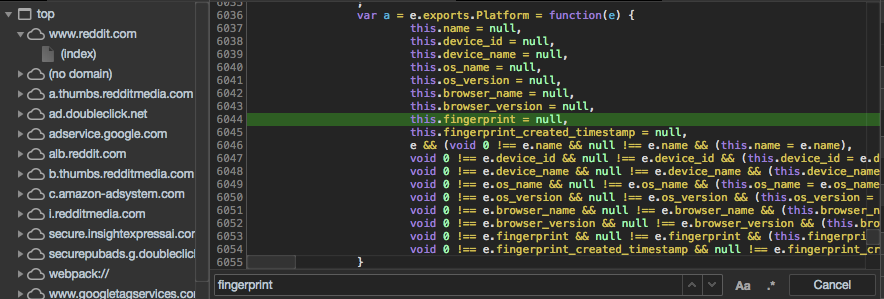
Sometimes, a single data point alone can provide an abundance of information. Here’s another popular example that we see attached to ads, or leaked through ad calls in other ways:
https://github.com/faisalman/ua-parser-js
UAParser.js — JavaScript library to identify browser, engine, OS, CPU, and device type/model from userAgent string.
Why should we care?
Tracking and privacy are complicated topics, but let’s assume for a second that legitimate advertisers, platforms, and analytics tools are out of the picture. This still leaves bad actors with a powerful tool to use and abuse in increasingly sophisticated ways.
The malvertising landscape is a high-octane game of cat and mouse where attackers need to iterate rapidly as security vendors get more adept at detection. For a bad actor, every payload reveal is a threat to the longevity of their campaign, especially if it happens in the wrong environment (e.g.: a scanner).
As a result, malvertisers are increasingly moving away from a “spray and pray” approach to triggering their payloads by leveraging some of the device fingerprinting techniques mentioned above to check if their campaign is being delivered to an individual ripe for a successful attack.
The endgame for the typical forced mobile redirect is a phishing page much like this familiar example:
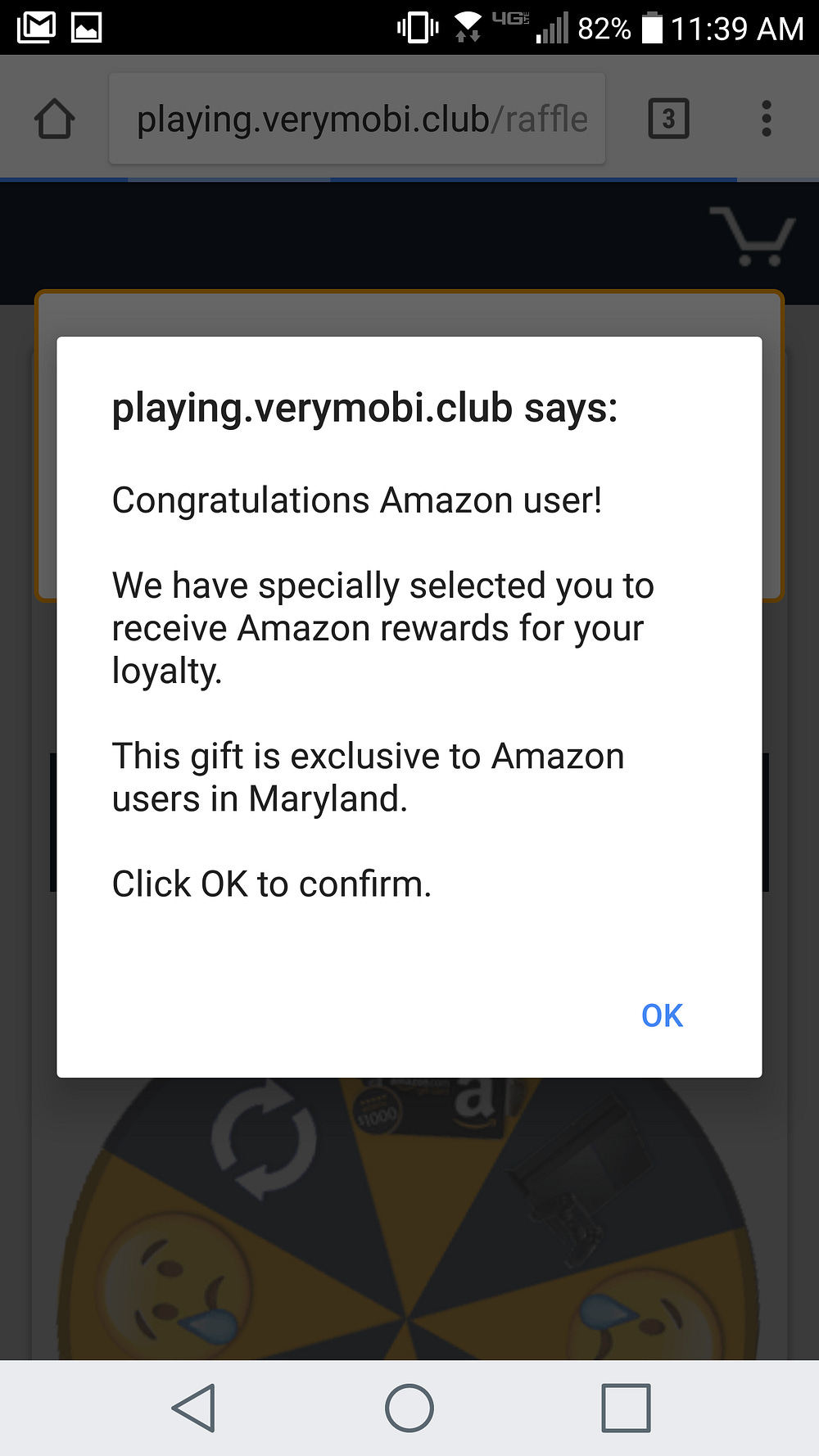
Folks who fall for the trick will then need to submit their personal information through a form. The information will either be used for CPA fraud or perhaps even aggregated and sold somewhere. Another flavor of phishing landing page might look something like this:

The copy on this page happens to be device specific, and will ultimately lead to an actual malware install.
Despite the obvious use of fingerprinting to target the landing page copy, there’s usually a bit more going on behind the scenes for the more sophisticated bad actors. Fingerprinting will usually start at the creative level where the attacker will determine if the impression is being served to a human worthy of a redirect. An example attack might take the following precautions before triggering the payload:
Check that the impression is being served to the right device? (Android / IOS / Desktop)
Is it a new device worthy of targeting? (Certain browser API’s available that wouldn’t be available on older devices.)
How likely is it that the device is actually a scanner? ( e.g.: The battery API shows a power level of less than 100%)
Have we redirected this individual user before? (Detailed device fingerprint using canvas objects)
etc…
If the attacker’s creative determines that it’s not a worthwhile impression to reveal the payload, they can always show a dummy ad or fall back on IBV to recoup the purchase of the ad.
Where do we go from here?
Unfortunately there’s no easy and enforceable answer short of turning off all Javascript. While GDPR can help to keep already honest folks honest, a lot of these tracking techniques fly under the radar and store no data on the user’s browser the way that cookies do. Publishers need to continue to select their demand partners wisely or risk exposing their visitors to malicious activity via rogue ads. Of course, Confiant’s real-time blocking is always a powerful mitigation tool for malvertising attacks as well.
Archive: This article was originally published on our Confiant Medium blog on October 10, 2018
 | A guest post by
|